Automotive
A How-To on GPS Car Trackers

Known as the very first system of man-made satellites in the world, GPS, or the global positioning system, is just one of 4 global navigation satellite systems. As a GNSS, GPS is widely used nowadays, from marine and air navigation to locating your friend or co-worker through an app on your phone. This is exactly what car trackers allow you to do: keep an eye on your loved ones or employees, or prevent your vehicle from getting stolen or worse, dismantled at a junkyard.
What to Consider
Geofencing
One of the most commonly sought-after features of modern-day vehicle GPS trackers is called geofencing. This is the fact that you can set a boundary on a map so that the tracker will notify you when your vehicle enters or leaves said area. Geofencing is a more capable car tracker in terms of its monitoring and safety features.
Alerts
Another feature that is becoming more common with GPS trackers is the ability to alert you to changes. Be it the above example with geofencing, when your car is moving above a certain speed, when the ignition is turned on, or even when your vehicle stops abruptly, you can get alerts for all of these instances on your device.
Tracking
While car trackers do exactly what their name suggests, they can do it differently from others. If you go for a locator with real-time tracking, you’ll essentially have a device that sends and receives data in real time, meaning it doesn’t wait for a location change. Passive trackers, on the other hand, only track the vehicle location at an interval or when it starts or stops moving.
Installation Process
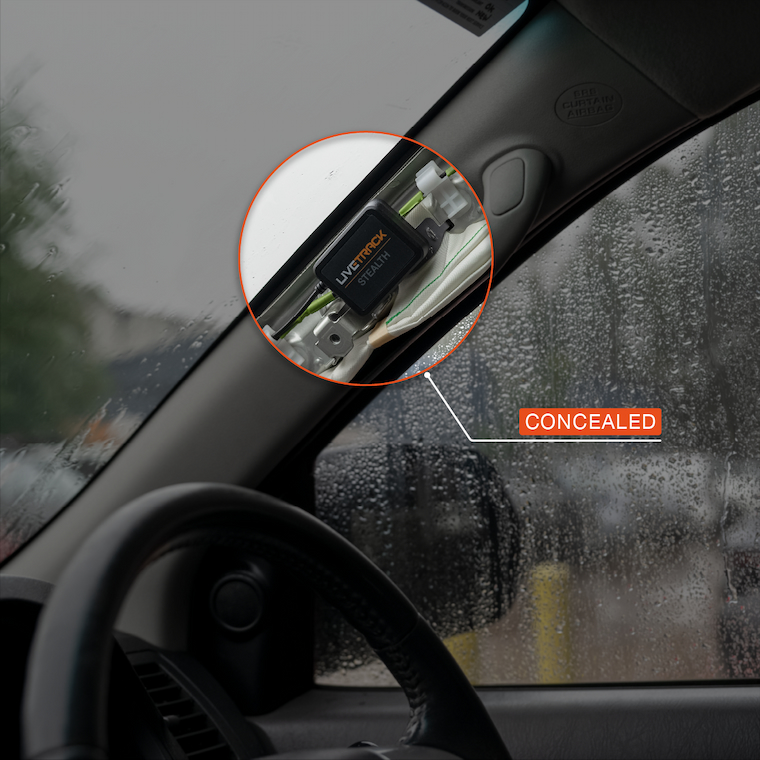
While not as easy to install as an air filter, a GPS tracker for car is not the most difficult either. Depending on the type of tracker you go for, you might only need to plug it in or fiddle with wires, but even if the latter is the case, it’s not as daunting as it sounds.
Compatibility
Something that you shouldn’t skimp on with a tracker is its compatibility with your vehicle. How it communicates with the ECU and gets data from your vehicle, as well as how it’s powered by it, if it’s such a model, makes a big difference. Ensure that the device you’re getting is compatible with your vehicle, since none of the above features will work.
Durability
The build quality of the tracker plays an important role in how durable it is, thus how long it will last you, no matter if it’s exposed to sun, moisture, or dust. Therefore, you should look for a car tracker with a proper IP rating of 66 or 67. Otherwise, you can expect a shorter lifespan than usual.
Types of Car Trackers
OBDII
The most convenient car tracker you can get is one that plugs into the OBDII port of your vehicle, hence the name. This port is located below the steering column, either close to the middle console or the door, depending on the manufacturer. Once in the port, the tracker draws power from the battery through it. Usually, these only require setup through an app on your phone.
Hardwired
With a hardwired tracker, you can expect a bit more faffing around than just plugging in stuff. You’ll need to splice, join, and crimp wires, which, if you haven’t done so before, can be challenging. However, a hardwired device doesn’t take up the OBD port, and it’s a more fitting long-term solution since it draws power directly from the battery.
Battery-Powered
Talking about batteries, you can skip the one in your vehicle altogether and get a device that relies on its own battery for power. This type of setup is more versatile since you can place the tracker anywhere you want without worrying about ports and wires. Just keep in mind that you’ll either have to charge it or replace its batteries from time to time.
Troubleshooting a GPS Car Tracker
No Response
When the tracker is not responding, it’s either that its battery is low, be it its own or the one in your vehicle, or it’s not getting power from the latter. If that doesn’t solve the issue, then you should try resetting it.
Inaccuracy
An inaccurate location means the device is being blocked by an object, especially if it’s a tall building, or it needs to have its firmware updated. If neither is the case, then it’s best to call customer support.
Battery
If it’s a battery-powered unit, poor battery life means you should replace the battery. If that’s not a viable solution at the moment, try reducing the frequency of location updates the device sends out or disabling features that aren’t needed. Again, if both options aren’t able to resolve the issue, customer support is your best bet.